Smart board bulb replacement: is it worth the cost?
The usual failure mode is not dramatic. The SMART Board projector does not always die with a pop and a warning light. More often, the room just gets harder to read. Teachers start dimming the lights. Students at the back squint. Someone bumps the contrast.
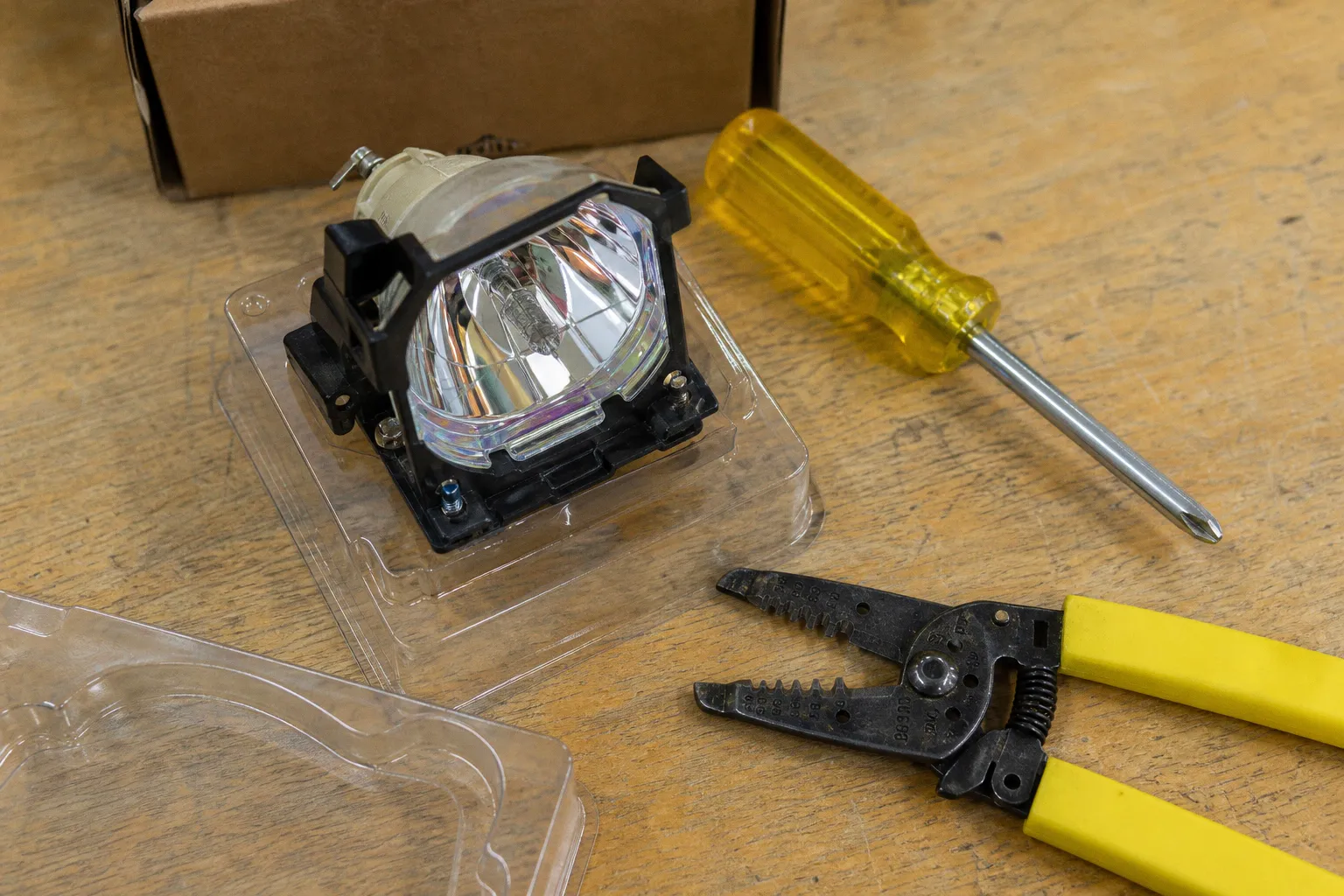
That is the real question behind smart board bulb replacement: not “Can I put another lamp in this projector?” You can. The question is whether feeding lamps, filters, labor, and calibration time into an aging interactive whiteboard rig is still a sane maintenance loop — or whether the smarter move is to stop patching the old stack and move to an interactive flat panel.
This is one of those classroom AV decisions where the cheap fix is only cheap if you ignore the rest of the payload.
The hidden economics of projector lamp maintenance
A smart board bulb is not just a bulb. In most SMART Board projector setups — UF55, UF65, UX80, and similar classroom workhorses — the lamp sits inside a housing assembly, runs hot, degrades over time, and drags the whole visual system down with it. The projector may keep throwing an image long after the image is no longer good enough for daily teaching.
Genuine OEM replacement lamps for common SMART Board projectors typically land between $250.00 and $368.40. That is the cleanest path: correct housing, correct thermal behavior, fewer surprises. Third-party assemblies with a genuine OEM bulb inside usually sit in the $79.99 to $149.99 range, which is why they show up in procurement carts. Cheap knock-offs can dip under $55, and that is where the maintenance story starts looking like a bug report written in smoke.
The lamp itself usually runs 3,000 to 5,000 hours. In a typical classroom, that means replacement every 18 to 24 months. On paper, that sounds manageable. One lamp every couple of school years. Script it into the maintenance calendar, trigger the order, done.
Except lamps do not fail like a binary switch. They decay. After 1,000 to 1,500 hours, a projector lamp can lose 20% to 30% of its original brightness. That loss hits contrast first, then readability, then classroom behavior. Nobody files a ticket saying “projector lumen output down 27%.” They file tickets saying “screen looks washed out,” “touch alignment feels off,” or “board is unusable with lights on.”
The lamp may still be alive, but the lesson has already started paying the tax.
That tax is multiplied across rooms. One projector with a dim bulb is a nuisance. Thirty projectors with staggered lamp ages become an unmanaged fleet: different brightness levels, different color temperatures, different teacher tolerance thresholds, and different hidden maintenance timers.
If you are running facilities or school IT, this is not a device problem. It is a lifecycle problem.
OEM vs. third-party assemblies: the price gap is real, but so is the risk
The smartboard projector lamp market has three practical tiers. The labels are messy because everyone wants to sound “compatible,” but the behavior is not the same.
| Option | Typical cost | What you are really buying | Risk profile |
|---|---|---|---|
| Genuine OEM lamp assembly | $250.00–$368.40 | Manufacturer-grade lamp and housing matched to the projector | Lowest practical risk, highest unit cost |
| Third-party housing with genuine OEM bulb | $79.99–$149.99 | A cheaper assembly using a legitimate bulb source | Reasonable middle ground if supplier quality is known |
| Cheap generic or knock-off lamp | Under $55 | Unknown bulb, unknown housing tolerances, unknown thermal behavior | High risk: overheating, melted internals, premature failure, possible lamp rupture |
The annoying part is that all three may appear in search results with nearly identical phrasing. “Replacement lamp for SMART Board UF65.” “Compatible projector bulb.” “OEM equivalent.” Procurement systems are terrible at parsing that nuance; they see line-item savings and move on.
But projector lamps are thermal components, not printer paper. A bad lamp can run too hot. A poor housing can fit just well enough to install and just poorly enough to cook surrounding plastics. Cheap knock-offs have documented risks: overheating, melting internal projector components, and premature explosion. No, that does not mean every non-OEM lamp is a grenade. It does mean “under $55 and ships tomorrow” should not be treated as a clever hack.
The useful middle option is the third-party assembly that contains a genuine OEM bulb. It trims the cost without falling all the way into random-marketplace roulette. But even there, treat the supplier as part of the system. If the vendor cannot state clearly what bulb is inside the housing, you do not have a spec; you have a wish.
The procurement trap: buying the cheapest lamp for the most expensive room
A classroom projector is not expensive because of the hardware alone. It is expensive because it is in the path of instruction. When it fails, you are not just swapping a component; you are interrupting the day’s operating system.
That is why the “OEM vs generic smart board bulb” choice should not be reduced to sticker price. A $55 lamp that causes a second visit, a melted lamp cage, or another failure two months later is not a bargain. It is a deferred ticket with better camouflage.
The more useful decision tree looks like this:
1. If the projector is young and optically healthy, use OEM or a proven OEM-bulb third-party assembly. Preserve the asset. Do not introduce thermal chaos into a working unit.
2. If the projector is already dim, noisy, misaligned, or past three years of heavy use, treat the lamp as a diagnostic expense, not a renewal plan. A new lamp may help, but it will not reverse every aging component.
3. If the room is mission-critical or used all day, avoid bargain-bin generics. The operational risk is too high for the savings.
4. If multiple projectors are due for lamps in the same budget cycle, run the five-year math before ordering. That batch purchase may be the signal to migrate, not restock.
This is where many organizations make the wrong move: they approve lamp replacements one at a time, never letting the total cost surface. The system stays alive because the spending is fragmented.
Brightness loss is not fixed by pretending the lamp is new
Replacing an interactive whiteboard bulb can make a dim projector look better. It cannot make an old projector factory-new.
That distinction matters. A lamp is only one node in the optical chain. Over time, other parts of the projector age too: optics collect dust, filters clog, color behavior shifts, and internal components suffer from heat cycles. A new lamp pushes more light through the system, but it does not reset the whole stack.
The classroom symptom is familiar: the lamp gets replaced, the image improves for a while, but it still does not look as sharp or punchy as a modern display. Text is readable but soft. Whites are uneven. The top edge of the image is slightly off. Touch works, but only after recalibration and occasional pleading.
This is why interactive whiteboard bulb replacement often feels satisfying for the first week and underwhelming by the second semester. You fixed the loudest variable. You did not fix the architecture.
Projector-based boards are also at war with the room. Ambient light washes them out. Blinds become part of the AV system. Front rows cast shadows. Ultra-short-throw projectors reduce some of that pain, but they do not escape the physics: projected light is competing with the environment.
Interactive flat panels changed that baseline. Their LED backlights are rated around 50,000 to 100,000 hours, which translates to roughly 15 to 20 years of daily use in many education contexts. There is no lamp brightness curve to nurse. No projector bulb counter. No filter routine masquerading as a surprise chore.
No, that does not mean panels are cheaper upfront. A 75-inch 4K interactive flat panel in 2026 commonly sits around $2,800 to $4,000. That is a real capital purchase, not a maintenance nibble. But it changes the failure model from “replace consumables forever” to “buy the display and manage software, mounting, and input compatibility.”
And if you have ever maintained a fleet of projectors, you already know which failure model generates fewer tickets.
Labor, calibration, and the maintenance payload nobody budgets honestly
The lamp invoice is only the visible part of the transaction. The rest is labor.
A proper smart board light replacement is not just “open hatch, swap bulb, go drink coffee.” The workflow usually looks more like this:
1. Power down and cool the projector safely.
2. Access the lamp compartment, often from a ceiling or wall-mounted position that was clearly designed by someone who does not answer service calls.
3. Remove the old lamp assembly without dumping dust into the optical path.
4. Install the replacement housing cleanly and securely.
5. Reset the lamp timer.
6. Clean or inspect filters.
7. Test brightness and image geometry.
8. Recalibrate the interactive whiteboard touch alignment.
9. Confirm the teacher’s actual inputs still behave: PC, document camera, speakers, wall plate, whatever local monster has been grafted on.
That can take up to 45 minutes per replacement when done properly, including filter cleaning and recalibration. Across a school, that is not a footnote. It is a maintenance sprint.
And because lamps degrade gradually, replacements rarely happen in one clean scheduled wave. They happen when rooms complain. That turns the AV team into a reactive daemon, waking up when the next brightness threshold trips.
A projector lamp is a consumable with a calendar attached. Ignore the calendar and it becomes an interruption engine.
There is also the alignment problem. SMART Board systems that pair projected images with touch-sensitive surfaces depend on geometry. Move the projector slightly, alter the image, disturb the mount, replace hardware carelessly, and calibration becomes part of the job. In a perfect room, it is quick. In real rooms, with wall flex, aging mounts, and teacher PCs that have collected a decade of display settings, it can become a ritual.
This is where interactive flat panels earn their keep. The display surface and the touch surface are integrated. There is no projected image to align to a separate board. You still have software issues — because software is where optimism goes to be punished — but the physical calibration burden drops sharply.
The three-year line: when replacement starts looking like denial
A useful rule: after a projector is about three years old, the cumulative cost of replacement bulbs and maintenance often starts to outweigh the depreciated value of the projector itself.
This is not a moral judgment on old hardware. I like keeping gear alive when the maintenance loop is elegant. But projector-based smart boards are not elegant aging systems. They are heat, lamps, filters, mounts, calibration, and declining brightness stacked into one classroom dependency.
Let’s model it without fake precision.
Say you replace a lamp every 18 to 24 months. If you use OEM lamps, each replacement is roughly $250 to $368 before labor. If you choose a reputable third-party assembly with an OEM bulb inside, you may be closer to $80 to $150. Add technician time, scheduling friction, and the fact that the replacement does not reset the rest of the projector’s aging optics. Now multiply by the number of rooms.
The more rooms you manage, the less sense it makes to evaluate each bulb as an isolated purchase. You need fleet logic.
A simple maintenance payload for each projector should include:
- Lamp cost over the next five years. One replacement is not the number; two or three may be.
- Labor time per event. Use the real 30–45 minute service window, not the fantasy “quick swap.”
- Filter cleaning and thermal risk. Dust is not decorative. It changes operating temperature.
- Calibration time. Any interactive system with separate projection and touch surfaces needs verification.
- Image quality decline. Brightness loss before lamp failure is a usability cost, not a cosmetic issue.
- Room value. A projector in a storage room and a projector in an all-day teaching space do not deserve the same decision.
If this list makes the lamp look less cheap, good. That is the point. Consumables look harmless when the spreadsheet has only one column.
When replacing the bulb still makes sense
There are cases where smart board bulb replacement is absolutely the right move. I am not here to shovel every projector into the e-waste bin on principle. Closed ecosystems deserve suspicion; working hardware deserves respect.
Replace the lamp if the projector is otherwise healthy, the room does not justify a panel yet, and you can source a reliable part. Also replace it if you need a bridge year while capital funding catches up. A $150 third-party assembly with a genuine OEM bulb can be a rational patch if everyone understands it is a patch.
The clean replacement scenario looks like this:
| Condition | Replace the bulb? | Why |
|---|---|---|
| Projector under three years old, image previously strong | Yes | You are preserving remaining asset life |
| Lamp warning active but optics and touch alignment are stable | Yes | This is normal consumable maintenance |
| Budget for IFP upgrade is approved next year | Maybe | Use a mid-range lamp only if the room cannot wait |
| Projector already dim after recent lamp replacement | No | The lamp is not the root cause |
| Unit has heat damage, noisy fans, alignment drift | No | You are feeding a failing stack |
| Multiple rooms need lamps at once | Recalculate | Batch lamp spend may justify panel migration |
The dangerous scenario is emotional replacement: “We already have the board, so let’s keep it going.” That logic sounds frugal and often is not. Sunk cost is not infrastructure strategy.
If you do replace the lamp, do it like a grown system owner:
- Buy OEM or a verified assembly with a genuine OEM bulb.
- Log installation date and projector hours.
- Clean filters during the same visit.
- Reset the lamp counter.
- Recalibrate touch immediately.
- Record brightness complaints after replacement; if they persist, flag the projector for retirement.
- Stop buying lamps for rooms already scheduled for panel upgrades unless the failure blocks daily use.
That last line is the one most organizations miss. Without a rule, maintenance keeps reviving devices that planning has already sentenced.
The case for interactive flat panels is not just brightness
Interactive flat panels win the obvious comparison: no smartboard projector lamp, no bulb timer, no projected image, no shadows, no filter cleaning routine. But the better argument is architectural.
Projector-based boards are an assembly of separate dependencies: projector, lamp, mount, board surface, touch calibration, computer, cabling, wall controls, sometimes audio, sometimes document cameras, sometimes wireless presentation dongles that behave like they were cursed in firmware. Every boundary is a failure point.
An IFP collapses several of those dependencies into one device. Display, touch, speakers, input switching, and often annotation tools are integrated. That does not eliminate ecosystem nonsense — panels still come with vendor software, update policies, account systems, and occasionally app stores that should be tried at The Hague — but it removes the lamp-driven maintenance loop.
For AV teams, the operational win is predictability. LED backlights rated for 50,000 to 100,000 hours shift the planning horizon. Instead of asking which projector bulbs are about to dim, you ask how long the panel fleet will remain supported, whether the OS update policy is sane, and whether the HDMI/USB-C paths work with your classroom computers.
That is a better class of problem. Still annoying. Less dusty.
The upfront cost remains the blocker. A 75-inch 4K interactive flat panel at $2,800 to $4,000 is not an impulse replacement for a $300 lamp. But if a projector is already several years old, needs recurring lamps, demands labor, and produces a compromised image, the panel is no longer competing against one bulb. It is competing against five years of keeping the old system breathing.
That is the math procurement needs to see.
Build the decision as a lifecycle trigger, not a panic order
The best way to handle smart board bulb replacement is to stop treating it as an emergency SKU and start treating it as a lifecycle trigger.
When a lamp warning appears, the workflow should fork:
1. Check projector age and hour count.
2. Inspect image quality before ordering.
3. Estimate whether this is the first, second, or third lamp cycle.
4. Look for heat symptoms: fan noise, discoloration, shutdowns, melted plastic smell.
5. Review room priority and daily usage.
6. Compare one-year bridge cost against panel migration timing.
If the projector is early in life, execute the lamp replacement cleanly. If it is late in life, open the upgrade path. Do not let the ticketing system default every lamp warning into another purchase order. That is how aging projector fleets survive long after the logic has failed.
For larger deployments, I would tag every projector with a simple status field:
| Status | Meaning | Action |
|---|---|---|
| Maintain | Healthy projector, acceptable brightness, first lamp cycle | Replace with OEM or verified OEM-bulb assembly |
| Bridge | Aging projector needed short-term | Use cost-controlled replacement only if necessary |
| Retire | Multiple lamp cycles, poor image, heat or calibration issues | Stop lamp purchases; schedule IFP replacement |
| Review fleet | Many units due simultaneously | Build bulk upgrade proposal instead of bulk lamp order |
This is not complicated automation. It is just decision logic. But even basic logic beats the default human workflow: wait for complaint, buy part, repeat until the room hates you.
The final call: a bulb is a fix, not a strategy
A smart board bulb replacement is worth it when the projector is still inside a sensible service window and the lamp is the obvious failing component. Spend the money, avoid the suspicious ultra-cheap knock-off, clean the filters, recalibrate, log the hours, and move on.
It is not worth it when the projector is already an aging maintenance sink. If the unit is past several years of daily use, has declining image quality, needs repeated service, or sits in a high-value classroom, the bulb is no longer a repair. It is a subscription to yesterday’s architecture.
The pragmatic answer is not “always replace” or “always upgrade.” It is this: treat every lamp purchase as a trigger to evaluate the whole display stack. If the math says one more bulb buys a clean bridge year, fine. If the math says you are paying technicians to keep dim projectors alive while modern interactive panels run for tens of thousands of hours without lamps, stop debugging the past.
Advanced config for the people who actually have to run this fleet: create a lamp-event log with projector model, install date, lamp source, cost tier, room usage, technician time, post-replacement brightness complaint, and next review date. After the second lamp cycle, auto-flag the room for panel migration planning. That tiny data layer will do what vendor brochures never do: expose the real cost of keeping the old system lit.